I've been running DeepSeek V4 Flash locally through antirez's DS4 engine for a while now. The model is good; the workflow is terminal-first. Pick a GGUF, build the server, pass the flags, watch the logs scroll. It works. But every time I wanted to swap a model or check throughput, I was back in a shell typing.
So I wrote a GUI for it: a native macOS app that manages the ds4-server process end to end. The fun part is that I built it with DeepSeek V4 Flash itself, served by DS4 on my own hardware. No cloud API touched the inference.
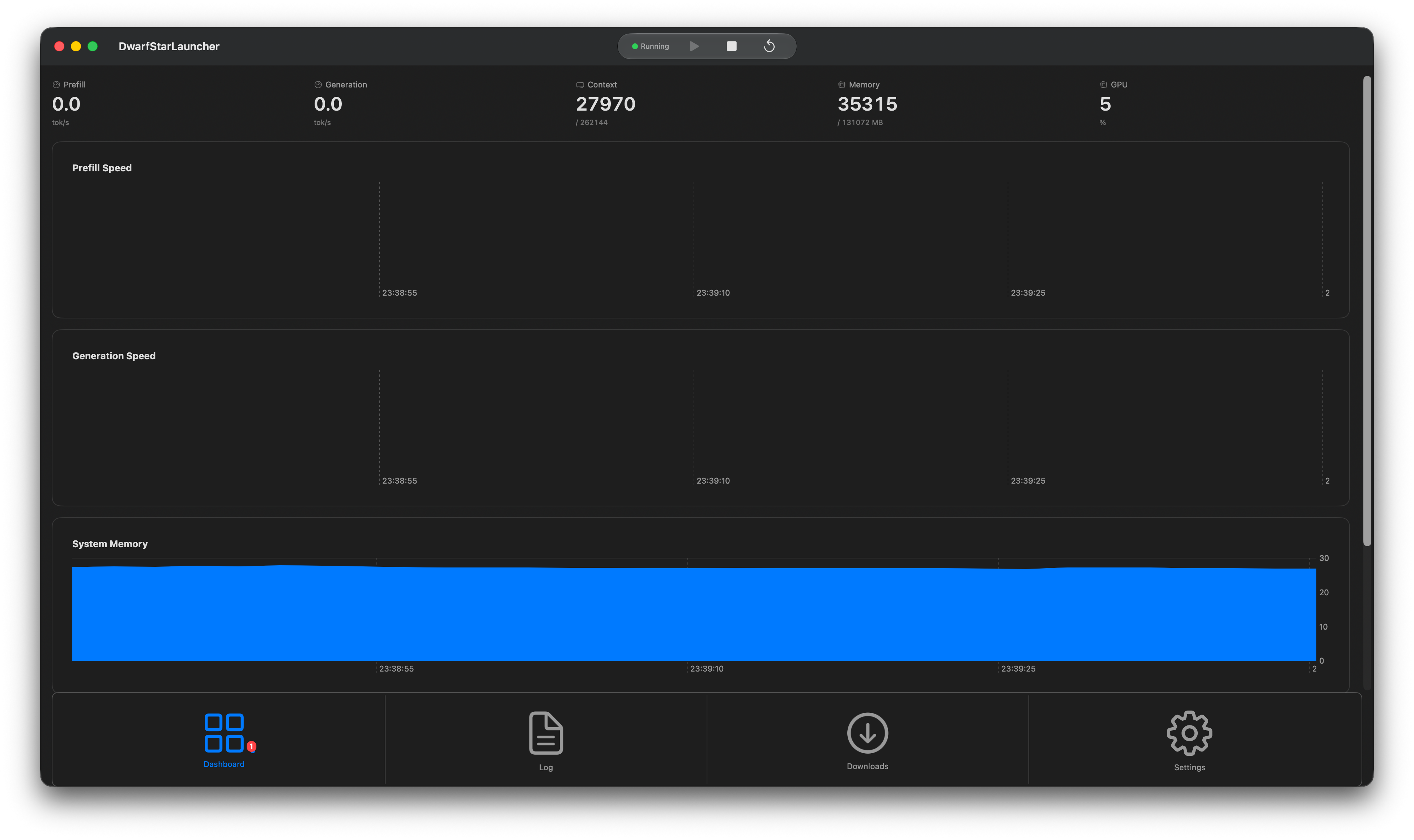
The main window, while the server is running:
The motivation
DS4 is a pure-C inference engine for DeepSeek V4 Flash and PRO. It's deliberately narrow, one model family done properly, and that focus is why it's good. The day-to-day is a terminal workflow:
./ds4 -m ./ds4flash.gguf --ctx 32768 --ssd-streaming --ssd-streaming-cache-experts 32GBPlus flags for MTP draft models and expert caches. The server reports telemetry in its logs, which is fine until you want to actually see what's happening while a long prefill runs.
I figured I wanted to write a GUI with some nice extra features: throughput as a chart instead of parsed log lines, a GGUF download with a progress bar, models in a dropdown, and a menu bar icon to stop the server.
The app
DwarfStarLauncher is SwiftUI, macOS 14.0+, and kept small. It handles the server lifecycle around ds4-server:
- Model management. Scans
~/.ds4-launcher/models/for.gguffiles, separates main models from MTP/DSpark draft models by filename, and downloads new ones from HuggingFace Hub with resume and SHA256 integrity checks. - Server lifecycle. Start, stop, and restart the ds4-server process with graceful shutdown.
- Live telemetry. Charts for prefill/generation tokens/sec, context utilization, memory, and GPU load, parsed from the log stream plus macOS APIs.
- Logs and tray. Color-coded auto-scrolling log viewer with ANSI support, and a menu bar icon so you can control the server without opening the window.
Zero external dependencies. Just Swift and SwiftUI.
The shell is dashboard-first now: three tabs (Dashboard / Log / Downloads), a toolbar strip with the status dot and Play/Stop/Restart controls, and a standard macOS Settings window with six config groups. I moved configuration out of a split view and into real Settings, something you only appreciate after a few days.
The meta part
What made the project worth building: I wrote the app with DeepSeek V4 Flash running on my own machine through DS4, the same stack the app manages. The loop was fully local. I'd describe a SwiftUI component to the model, it'd produce the code, I'd review it, and we'd iterate. No cloud calls, no data leaving the network.
Dogfooding a coding model on the tool it's meant to run was a fun loop to be stuck in. Every rough edge in the app doubled as a test of the model that wrote it. When the Swift Charts integration was awkward, that was a real finding about both the framework and the model's ability to write it.
What you get
You get a personal tool so keep that in mind. The app only runs on macOS 14+, expects the ds4-server binary either on your PATH or imported from a ds4 code checkout via Settings, and it's built around my own workflow. If you run DS4 on a DGX Spark or an AMD Strix Halo Box, my apologies.
I have thought about a multi platform app, but if I do so it will likely be a separate project.
It's worth noting that the telemetry parsing is a moving target too. DS4's log format shifts as the engine evolves, so the status monitor occasionally chases the format. I keep the parser regexes close to the log output for exactly that reason.
Why I'm writing this
Mostly because the loop is the point. We've got capable open-weight models and engines that run on hardware we own, and one of the useful things to do with them is build the tools around them, including the tools for running them. The app is MIT licensed and on GitHub if you want to poke at it.
If you're sitting on a 96-128 GB Mac with V4 Flash running through DS4 and the terminal workflow is starting to grate, give it a spin. If you do so, let me know how it goes, and have fun.